

Overview
Clay combined with Anysite MCP Server creates the ultimate data enrichment platform with unlimited access to social media data. With MCP Unlimited plan, your Clay tables can enrich leads with data from LinkedIn, Instagram, Twitter, Reddit, and more without any request limits or waterfall restrictions. Perfect for:- Lead enrichment and prospecting
- Company research and intelligence
- Contact data enrichment workflows
- Multi-platform data waterfall automation
- Competitive analysis and monitoring
MCP Unlimited Plan Required: This integration requires an active MCP Unlimited subscription ($30/month) for unlimited data extraction.
Prerequisites
Before you begin, ensure you have:- Active Clay account (Free or paid plan)
- Anysite account with MCP Unlimited subscription
- Basic understanding of Clay tables and enrichments
Step 1: Get Your MCP Connection URL
First, obtain your Direct URL from the Anysite dashboard:1
Log in to Anysite
Visit app.anysite.io and sign in to your account
2
Navigate to MCP Integration
Go to the MCP Server Integration section in your dashboard
3
Copy Direct URL
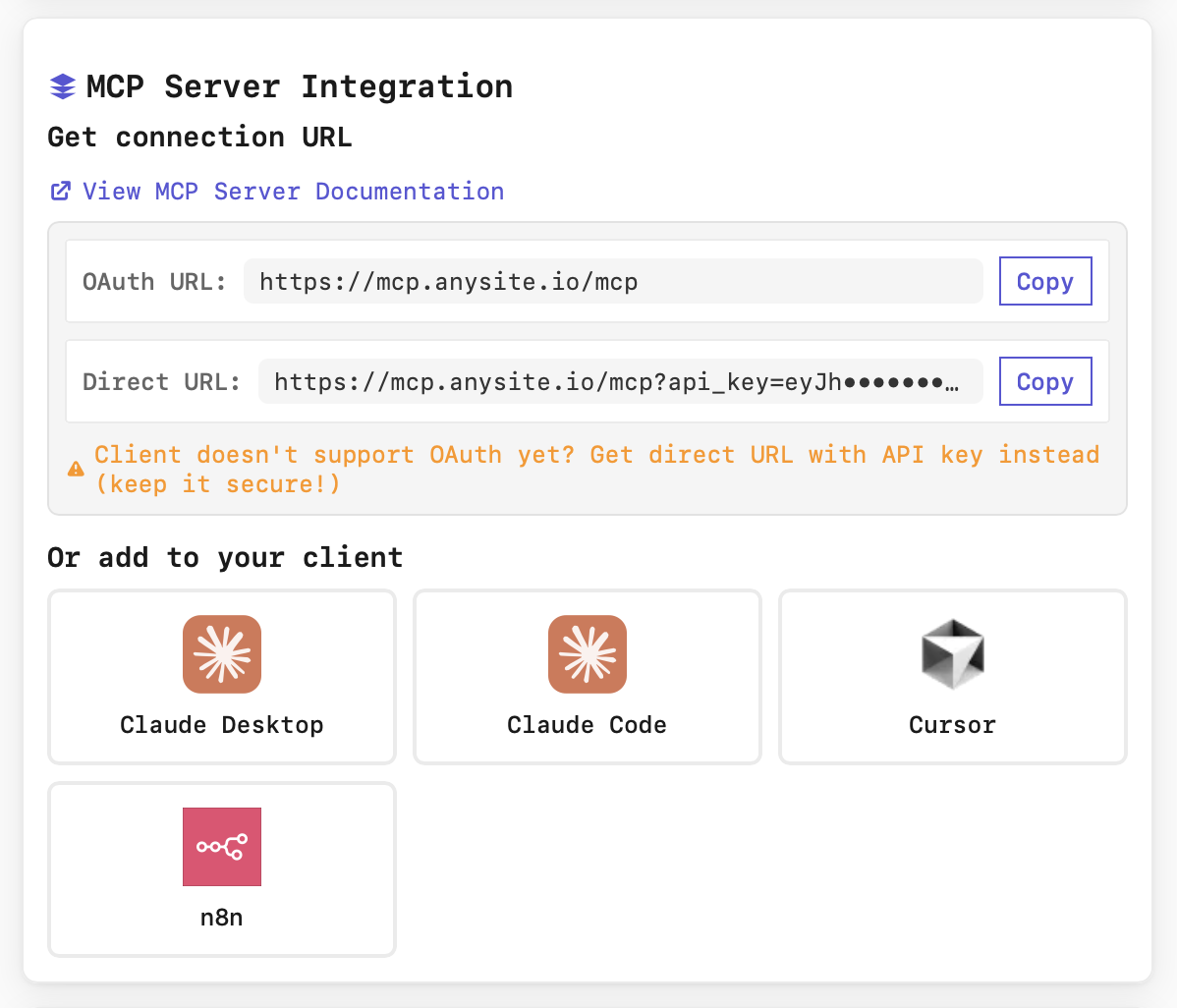
- OAuth URL:
https://mcp.anysite.io/mcp - Direct URL:
https://mcp.anysite.io/mcp?api_key=YOUR_KEY
Step 2: Configure MCP in Clay
Now connect the MCP Server to your Clay account:1
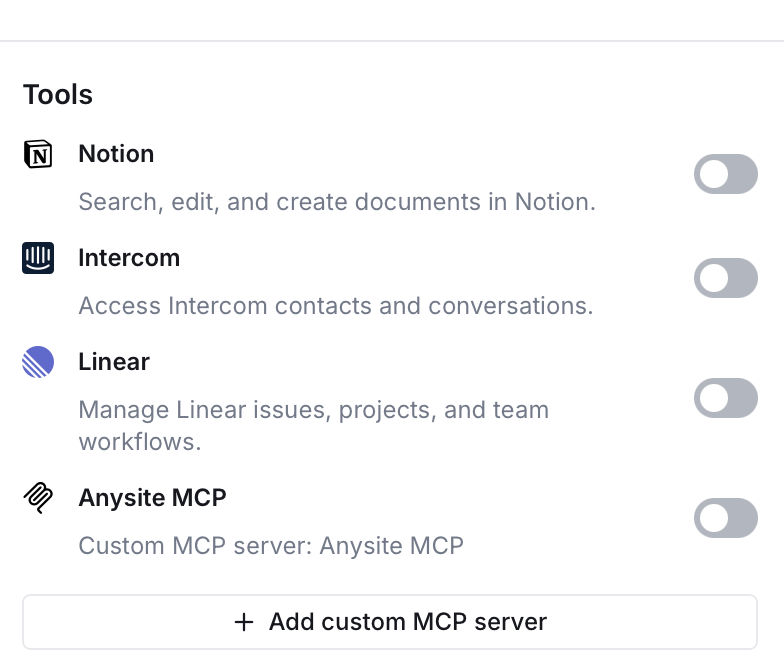
Open Clay Tools Settings
2
Add Custom MCP Server
3
Configure Connection
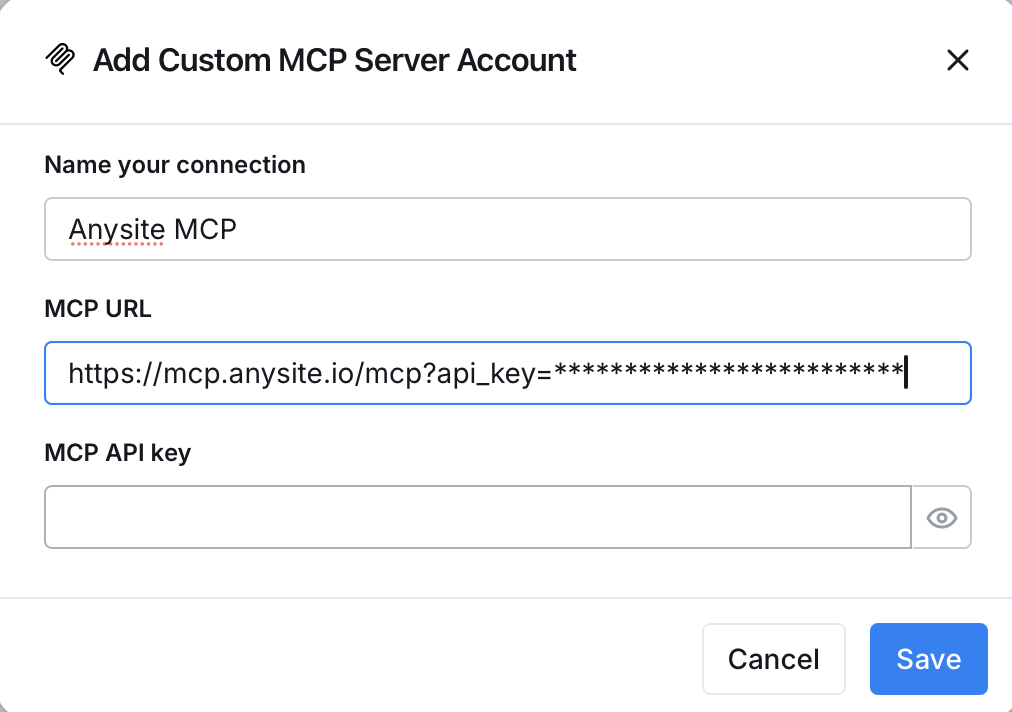
In the “Add Custom MCP Server Account” dialog, fill in:
- Name your connection: Enter “Anysite MCP” (or any name you prefer)
- MCP URL: Paste your Direct URL from Step 1
- MCP API key: Leave empty (authentication is in the URL)
- Click Save
4
Verify Connection
Once saved, the MCP connection will appear in your Tools list with a toggle to enable/disable it. Toggle it ON to activate. Your Clay account now has access to all 70+ Anysite tools!
Connection successful! Your Clay account can now use Anysite MCP tools in any table enrichment workflow.
Step 3: Using MCP in Clay Tables
After connecting MCP, you can use it in your Clay tables:System Prompt for Clay AI Agent
When using Clay’s AI enrichment features, configure your agent with:Available Tools
Your Clay enrichment workflows now have access to 70+ tools including: LinkedIn (27 tools)- Profile extraction, enrichment, and messaging
- Company research and employee data
- Post and comment analysis
- Employee search and filtering
- Job listings and company updates
- Profile data and bio information
- Posts, reels, and stories
- Comments and engagement metrics
- Follower and following analysis
- Profile information and bio
- Tweet extraction and analysis
- User and post search
- Engagement metrics
- Post details and content
- Comment threads
- Subreddit search
- User posts and comments
- Video search and metadata
- Channel videos extraction
- Video details and engagement
- Video comments analysis
- Subtitle extraction
- Company profiles
- Founder search
- Startup intelligence
- Company filings search
- Document retrieval
- Webpage parsing and extraction
- Sitemap extraction
- Web search and discovery
View All Tools
Browse complete list of all available MCP tools
Use Cases & Examples
1. Lead Enrichment Waterfall
Clay Table Setup:- Takes LinkedIn URL as input
- Uses
linkedin_userto extract full profile data - Uses
linkedin_companyto get company information - Uses
linkedin_user_poststo analyze recent activity - AI agent synthesizes data into enriched lead profile
2. Company Research & Intelligence
Use Case: Building a list of target companies with detailed research data Clay Workflow:- Input: Company LinkedIn URLs
- Enrichment 1: Extract company data with
linkedin_company - Enrichment 2: Get employee count and key personnel with
linkedin_company_employees - Enrichment 3: Analyze recent company posts with
linkedin_company_posts - Enrichment 4: AI agent creates company intelligence summary
- Output: Comprehensive company profiles with decision-maker insights
3. Multi-Platform Data Waterfall
Scenario: Enrich leads with data from multiple platforms, falling back when one source fails Clay Waterfall Setup:linkedin_usersearch_twitter_usersinstagram_userweb_search
4. Recruitment & Talent Sourcing
Use Case: Find and enrich potential candidates matching specific criteria Clay Workflow:- Search: Use
search_linkedin_userswith job title and location filters - Enrich: Extract detailed profiles with
linkedin_user - Analyze: Get recent posts and activity with
linkedin_user_posts - Score: AI agent evaluates fit based on experience and engagement
- Export: Push qualified candidates to ATS or CRM
5. Competitive Monitoring
Use Case: Track competitor activity across platforms automatically Clay Table:- Input: List of competitor LinkedIn company pages
- Schedule: Daily/weekly refresh
- Enrichments:
- Latest posts and announcements
- New hires and team changes
- Engagement metrics and trends
- Product launches and updates
- Output: Automated competitive intelligence report
Integration with Clay Workflows
Basic Enrichment Structure
Advanced Multi-Source Waterfall
Real-Time Data Pipeline
Troubleshooting
Connection fails or MCP server not showing
Connection fails or MCP server not showing
Possible causes:
- Invalid or expired API key
- Incorrect URL format
- Network connectivity issues
- Regenerate your Direct URL from Anysite dashboard
- Ensure the URL includes
?api_key=YOUR_KEYparameter - Check that your Anysite subscription is active
- Try removing and re-adding the MCP connection
- Toggle the MCP server ON in Clay Tools settings
MCP tools not available in enrichments
MCP tools not available in enrichments
Possible causes:
- Connection not properly saved or enabled
- MCP Unlimited plan not active
- Clay cache needs refresh
- Check that Anysite MCP toggle is ON in Tools settings
- Verify your MCP Unlimited subscription at app.anysite.io
- Try creating a new enrichment column
- Refresh your browser and check again
- Test with a simple LinkedIn URL enrichment
Rate limits or quota errors
Rate limits or quota errors
Note: With MCP Unlimited, you should have no rate limits for MCP requests.If you see errors:
- Verify you’re on MCP Unlimited plan (not pay-per-use)
- Check your subscription status in Anysite dashboard
- Direct API calls (outside MCP) are billed separately
- Clay’s own rate limits may still apply to non-MCP enrichments
- Contact support if issues persist
Enrichments fail or return empty data
Enrichments fail or return empty data
Possible causes:
- Invalid input URLs or identifiers
- Target profile is private or restricted
- Incorrect tool selection
- Verify input URLs are correctly formatted
- Check that LinkedIn URLs include full profile path
- Some private profiles may not return data
- Try alternative tools from the same platform
- Review tool documentation for required parameters
Authentication errors
Authentication errors
Error message: “Invalid API key” or “Unauthorized”Solutions:
- Your API key in the Direct URL may be incorrect
- Go to app.anysite.io and copy a fresh Direct URL
- Delete the MCP connection in Clay and recreate it
- Ensure you copied the entire URL including the key parameter
- Check for any extra spaces or characters in the URL
Security Best Practices
Protect API Keys
Never expose your Direct URL in:
- Shared Clay tables
- Public workspaces
- Screenshots
- Documentation
- Version control
Access Control
Manage Clay workspace access:
- Only invite trusted team members
- Use separate API keys for different teams
- Monitor enrichment activity in Clay logs
- Review Anysite usage dashboard regularly
Data Privacy
Handle extracted data responsibly:
- Follow GDPR and data protection laws
- Don’t store sensitive data unnecessarily
- Implement data retention policies
- Respect platform terms of service
- Use Clay’s data encryption features
Monitor Usage
Track your enrichment activity:
- Review Clay table run history
- Check Anysite dashboard for usage patterns
- Set up alerts for failed enrichments
- Monitor API response times
- Track data quality and success rates
Benefits of Clay + MCP Integration
Unlimited Enrichments
With MCP Unlimited ($30/month), enrich as many leads as you need without worrying about waterfall limits, credit usage, or overage charges.
No Waterfall Restrictions
Unlike traditional Clay enrichments, MCP tools have no waterfall restrictions. Use them as primary sources without burning through expensive credits.
70+ Data Sources
Single connection gives you access to LinkedIn, Instagram, Twitter, Reddit, and web data - all unified in your Clay workflows.
Real-Time Data
Extract fresh data in real-time directly from platforms. No stale databases or outdated information - always get the latest data.
Next Steps
View All MCP Tools
Explore the complete list of 70+ tools available for enrichments
MCP Unlimited Plan
Learn more about MCP Unlimited benefits and pricing
Dashboard
Manage your subscription and monitor usage
Clay
Create your Clay account and start building enrichment workflows
Support
Need help with Clay + MCP integration?Email Support
Get technical assistance from our team
Documentation
Browse complete MCP documentation
Community
Join discussions and share use cases
Status Page
Check API status and uptime
Ready to supercharge your data enrichment? Connect your Clay account to Anysite MCP and unlock unlimited enrichments today!