> ## Documentation Index
> Fetch the complete documentation index at: https://docs.anysite.io/llms.txt
> Use this file to discover all available pages before exploring further.
# n8n AI Agent 集成
> 将 Anysite MCP 服务器连接到 n8n AI Agents,实现无限数据提取和工作流自动化
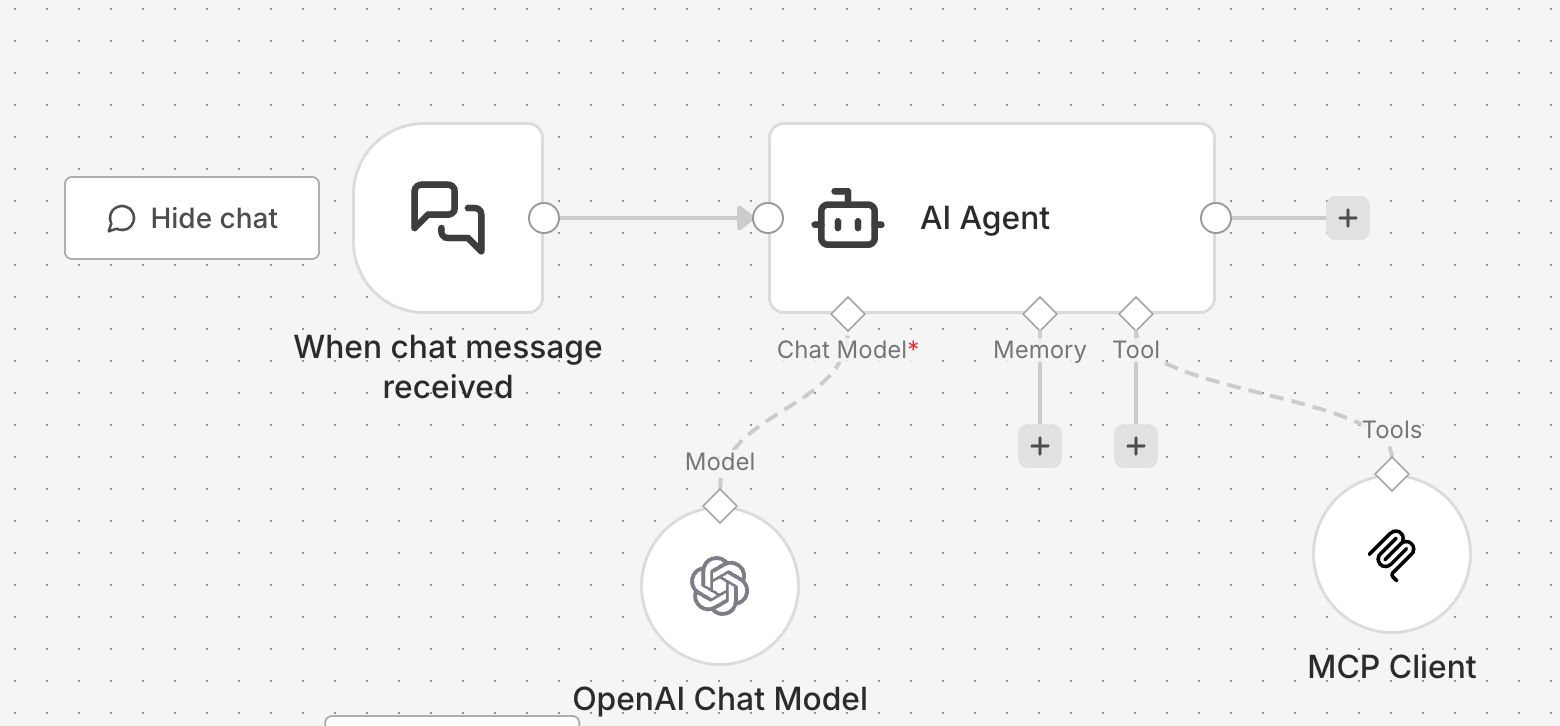 ## 概述
n8n AI Agents 与 Anysite MCP 服务器结合,打造强大的平台,用于构建具有无限社交媒体数据访问权限的自主 AI 代理。通过 MCP Unlimited 计划,您的 n8n AI Agents 可以从 LinkedIn、Instagram、Twitter、Reddit、YouTube、SEC 文件、Y Combinator 数据库等平台提取数据,无任何请求限制 - 全部集成到您的 n8n 工作流中。
**适用场景:**
* 工作流中的自主研究代理
* 线索丰富和 CRM 自动化
* 竞争对手监控工作流
* 多平台数据聚合管道
* 使用 n8n cron 进行定时情报收集
* AI 驱动的工作流自动化
**需要 MCP Unlimited 计划:** 此集成需要有效的 MCP Unlimited 订阅(\$30/月)才能实现无限数据提取。
## 下载预构建工作流
点击下载带有 Anysite MCP 集成的即用型 n8n AI Agent 工作流
**工作流包含:**
* 预配置的带有 MCP 连接的 AI Agent
* 示例提示词和使用案例
* 错误处理和日志记录
* 可自定义的结构
## 前提条件
在开始之前,请确保您具备:
* 自托管的 n8n 实例或 [n8n.cloud](https://n8n.cloud) 账户
* 拥有 MCP Unlimited 订阅的 Anysite 账户
* 对 n8n 工作流和 AI Agent 节点的基本了解
## 第一步:获取您的 MCP 连接 URL
首先,从 Anysite 控制面板获取您的 Direct URL:
访问 [app.anysite.io](https://app.anysite.io) 并登录您的账户
在控制面板中进入 **MCP Server Integration** 部分
## 概述
n8n AI Agents 与 Anysite MCP 服务器结合,打造强大的平台,用于构建具有无限社交媒体数据访问权限的自主 AI 代理。通过 MCP Unlimited 计划,您的 n8n AI Agents 可以从 LinkedIn、Instagram、Twitter、Reddit、YouTube、SEC 文件、Y Combinator 数据库等平台提取数据,无任何请求限制 - 全部集成到您的 n8n 工作流中。
**适用场景:**
* 工作流中的自主研究代理
* 线索丰富和 CRM 自动化
* 竞争对手监控工作流
* 多平台数据聚合管道
* 使用 n8n cron 进行定时情报收集
* AI 驱动的工作流自动化
**需要 MCP Unlimited 计划:** 此集成需要有效的 MCP Unlimited 订阅(\$30/月)才能实现无限数据提取。
## 下载预构建工作流
点击下载带有 Anysite MCP 集成的即用型 n8n AI Agent 工作流
**工作流包含:**
* 预配置的带有 MCP 连接的 AI Agent
* 示例提示词和使用案例
* 错误处理和日志记录
* 可自定义的结构
## 前提条件
在开始之前,请确保您具备:
* 自托管的 n8n 实例或 [n8n.cloud](https://n8n.cloud) 账户
* 拥有 MCP Unlimited 订阅的 Anysite 账户
* 对 n8n 工作流和 AI Agent 节点的基本了解
## 第一步:获取您的 MCP 连接 URL
首先,从 Anysite 控制面板获取您的 Direct URL:
访问 [app.anysite.io](https://app.anysite.io) 并登录您的账户
在控制面板中进入 **MCP Server Integration** 部分
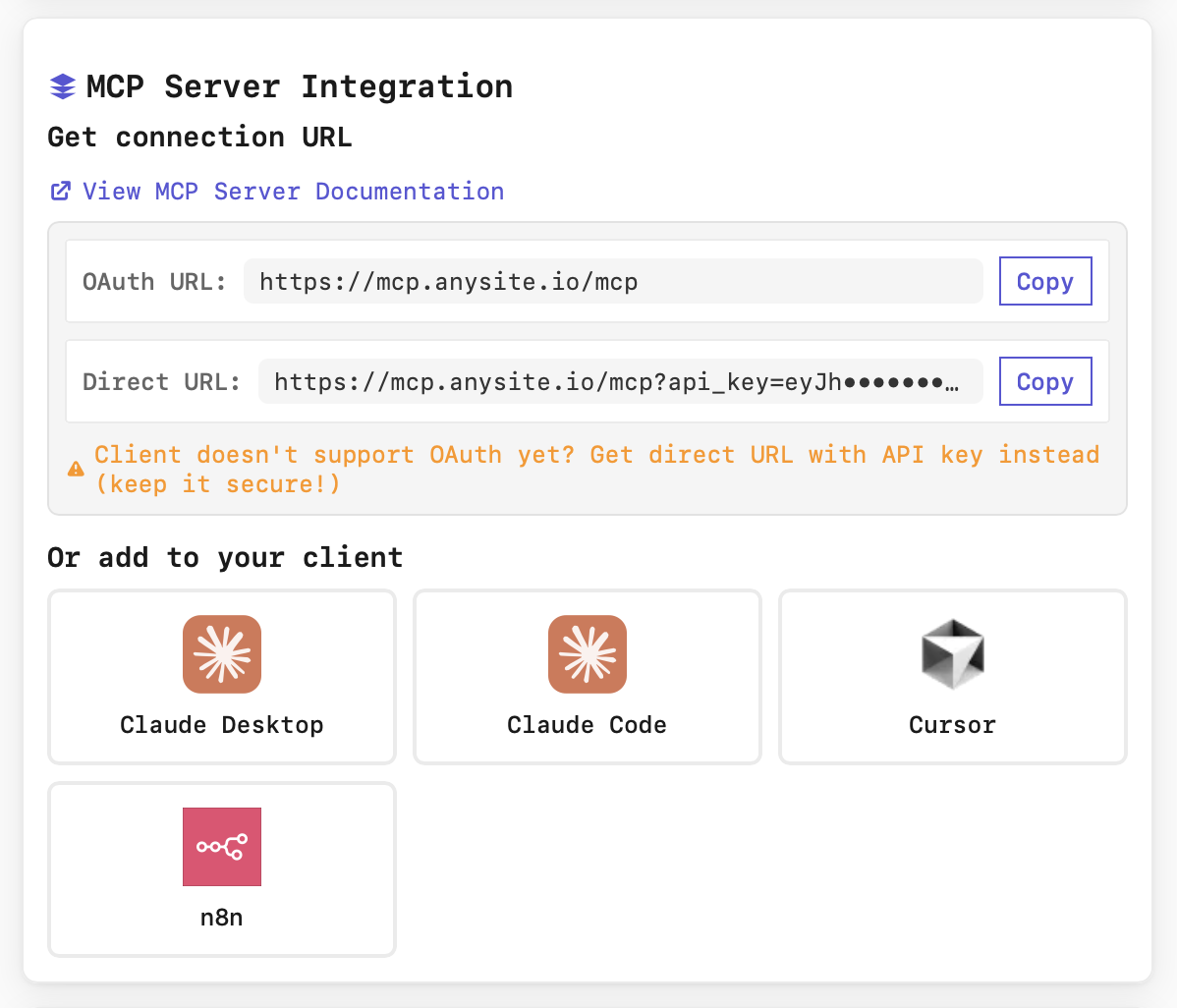 您将看到两个连接选项:
* **OAuth URL**:`https://mcp.anysite.io/mcp`
* **Direct URL**:`https://mcp.anysite.io/mcp?api_key=YOUR_KEY`
点击 **Direct URL** 旁边的 **Copy** 按钮 - 其中包含用于身份验证的 API 密钥。
**安全提示:** 您的 Direct URL 包含 API 密钥。请妥善保管,切勿公开分享或提交到版本控制系统。
## 第二步:在 n8n AI Agent 中配置 MCP
现在将 MCP 服务器连接到您的 n8n AI Agent 节点:
打开 n8n 并创建新工作流或打开您想要使用 AI Agent 的现有工作流。
1. 点击 **+** 按钮添加新节点
2. 搜索 **"AI Agent"** 或 **"@n8n/n8n-nodes-langchain.agent"**
3. 将 AI Agent 节点添加到画布
您将看到两个连接选项:
* **OAuth URL**:`https://mcp.anysite.io/mcp`
* **Direct URL**:`https://mcp.anysite.io/mcp?api_key=YOUR_KEY`
点击 **Direct URL** 旁边的 **Copy** 按钮 - 其中包含用于身份验证的 API 密钥。
**安全提示:** 您的 Direct URL 包含 API 密钥。请妥善保管,切勿公开分享或提交到版本控制系统。
## 第二步:在 n8n AI Agent 中配置 MCP
现在将 MCP 服务器连接到您的 n8n AI Agent 节点:
打开 n8n 并创建新工作流或打开您想要使用 AI Agent 的现有工作流。
1. 点击 **+** 按钮添加新节点
2. 搜索 **"AI Agent"** 或 **"@n8n/n8n-nodes-langchain.agent"**
3. 将 AI Agent 节点添加到画布
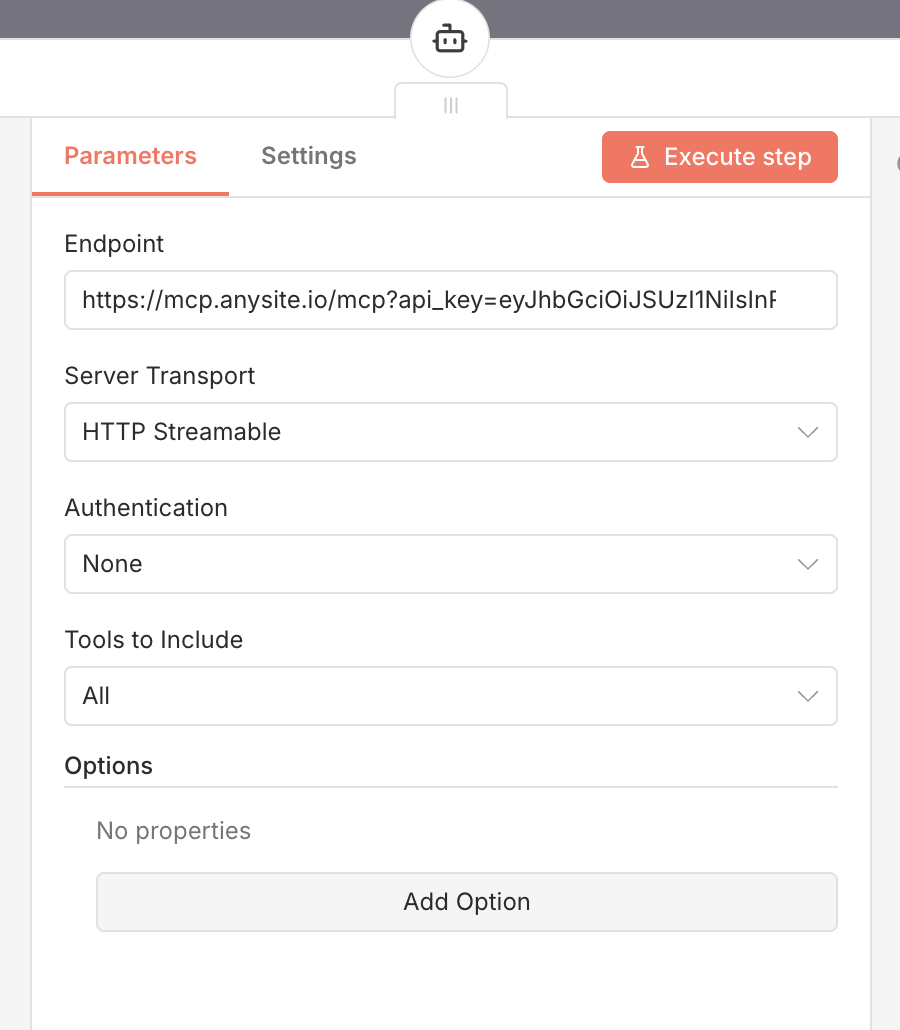 在 AI Agent 节点配置中:
1. 进入 **Tools** 部分
2. 点击 **Add Tool**
3. 从列表中选择 **MCP Tool**
4. 在 MCP Tool 配置中:
* **Server URL**:粘贴第一步获取的 Direct URL
```
https://mcp.anysite.io/mcp?api_key=YOUR_API_KEY
```
* **Name**:"Anysite MCP"(或任何描述性名称)
5. 点击 **Save** 或 **OK**
保存后,MCP 工具应该出现在 AI Agent 的可用工具列表中。您可以通过以下方式验证:
* 查看 Tools 部分 - 应显示"70 tools available"
* 在 n8n 的测试模式下使用简单提示进行测试
**连接成功!** 您的 n8n AI Agent 现在可以使用 Anysite MCP 工具在工作流中从任何支持的平台提取数据。
## 第三步:配置代理行为
连接 MCP 后,配置您的 AI Agent 以有效使用它:
### 系统提示词示例
```
You are an AI research agent integrated into an n8n workflow with access to Anysite MCP tools.
Use these tools to extract data from LinkedIn, Instagram, Twitter, Reddit, YouTube, SEC, and Y Combinator.
When the user requests information:
1. Identify the appropriate MCP tool(s) to use
2. Extract the data using the tools
3. Analyze and structure the information
4. Return JSON-formatted results for the workflow
Available platforms: LinkedIn, Instagram, Twitter, Reddit, YouTube, SEC EDGAR, Y Combinator, Web Parser
Always provide accurate, well-structured data that can be processed by subsequent workflow nodes.
```
### 可用工具
您的 n8n AI Agent 现在可以访问 70+ 工具,包括:
**LinkedIn(27 个工具)**
* 个人资料提取和搜索
* 公司研究和员工数据
* 帖子和评论分析
* LinkedIn 消息和聊天
* 职位列表和群组
**Instagram(8 个工具)**
* 个人资料数据和指标
* 帖子和 Reels 提取
* 评论和点赞分析
* 粉丝/关注数据
**Twitter/X(5 个工具)**
* 个人资料信息
* 推文提取和搜索
* 用户发现
**Reddit(5 个工具)**
* 帖子详情和搜索
* 评论提取
* 用户帖子和评论
**YouTube(5 个工具)**
* 视频搜索和元数据
* 频道视频提取
* 视频详情和互动数据
* 视频评论分析
* 字幕/文字记录提取
**Y Combinator(3 个工具)**
* 按 slug 获取公司资料
* 搜索 YC 公司
* 搜索 YC 创始人
**SEC(2 个工具)**
* 搜索 SEC EDGAR 文件
* 检索 SEC 文档
**Web 工具(3 个工具)**
* 网页解析
* 网站地图提取
* 网络搜索
浏览所有 70 个可用 MCP 工具的完整列表
## 使用案例和示例
### 1. 线索丰富工作流
**n8n 工作流:**
```
Webhook → AI Agent (MCP) → Enrich Contact → Save to CRM
```
**代理提示词:**
```
"Research {{$json.email}} on LinkedIn. Find their profile, current company,
job title, and recent activity. Return structured JSON."
```
**代理执行操作:**
1. 使用 `find_linkedin_user_email` 查找个人资料
2. 使用 `get_linkedin_profile` 提取详细信息
3. 使用 `get_linkedin_user_posts` 获取活动
4. 向工作流返回结构化 JSON
**工作流输出:**
* 丰富的联系人数据流向下一个节点
* 自动 CRM 更新
* 邮件个性化数据准备就绪
### 2. 竞争对手监控工作流
**n8n 工作流:**
```
Schedule (Daily) → AI Agent (MCP) → Format Report → Send to Slack
```
**代理提示词:**
```
"Monitor competitor 'TechCorp' on LinkedIn:
- Get last 7 days of posts
- Extract engagement metrics
- Identify trending topics
Return JSON with summary."
```
**使用的工具:**
* `search_linkedin_companies` 查找公司
* `get_linkedin_company_posts` 获取最近帖子
* 代理分析和结构化结果
**自动化:**
* 每天上午 9 点运行
* 自动 Slack 通知
* 无需人工干预
### 3. 多平台研究管道
**n8n 工作流:**
```
Manual Trigger → AI Agent (MCP) → Split Data → Parallel Processing → Merge Results → Output
```
**代理提示词:**
```
"Find all mentions of 'AI automation tools' across:
- LinkedIn (posts from last week)
- Twitter (tweets from last week)
- Reddit (discussions from last month)
- YouTube (videos from last 3 months)
Analyze sentiment and provide summary."
```
**使用的工具:**
* `search_linkedin_posts`
* `search_twitter_posts`
* `search_reddit_posts`
* `search_youtube_videos`
* 代理综合多平台洞察
### 4. SEC 财务情报工作流
**n8n 工作流:**
```
HTTP Request → AI Agent (MCP) → Extract Financial Data → Store in Database
```
**代理提示词:**
```
"Get latest 10-K and 10-Q filings for {{$json.company_name}}.
Extract key financial metrics, risk factors, and MD&A summary."
```
**使用的工具:**
* `search_sec_companies` 查找文件
* `get_sec_document` 检索完整文档
* 代理解析和提取结构化数据
**使用案例:** 自动化财务尽职调查管道
### 5. Y Combinator 创业公司研究
**n8n 工作流:**
```
Airtable Trigger → AI Agent (MCP) → YC Research → Update Airtable
```
**代理提示词:**
```
"Research YC company {{$json.slug}}:
- Get company profile
- Find founders and backgrounds
- Identify batch and status
Return structured data for database."
```
**使用的工具:**
* `get_yc_company` 获取公司资料
* `search_yc_founders` 获取团队数据
* 结构化输出用于 Airtable 更新
## 与 n8n 工作流集成
### 基本工作流结构
**典型的带有 AI Agent 的 n8n 工作流:**
1. **触发器** - Webhook、定时或手动触发
2. **AI Agent** - 使用 MCP 工具处理请求
3. **处理结果** - Code 或 Set 节点结构化数据
4. **输出** - 发送到 CRM、数据库、Slack 或邮件
### 多代理设置
对于复杂工作流,使用多个 AI Agent:
* **研究代理** - 使用 MCP 工具收集数据
* **分析代理** - 处理和分析数据
* **合并和报告** - 综合洞察并生成输出
### 错误处理
实施健壮的错误处理:
* 在 AI Agent 后使用 **IF 节点** 检查成功
* 为成功和错误情况创建单独的路径
* 将错误记录到数据库或发送通知
* 为失败操作实施重试逻辑
## n8n 特定功能
### 1. 表达式集成
在 n8n 表达式中访问 AI Agent 结果:
```javascript theme={null}
// 获取前一个 AI Agent 节点的数据
{{ $json.research_results }}
// 访问特定字段
{{ $json.linkedin_profile.name }}
{{ $json.company_data.employee_count }}
```
### 2. 循环处理结果
使用 n8n 的循环功能处理多个项目:
1. **Split In Batches** - 将输入数据分成可管理的块
2. **AI Agent** - 使用 MCP 工具处理每个项目
3. **聚合结果** - 合并所有处理后的数据
### 3. 条件工具使用
```javascript theme={null}
// 在 AI Agent 系统提示词中
"If the request is about LinkedIn, use linkedin_* tools.
If it's about SEC filings, use search_sec_companies and get_sec_document.
If it's about YouTube, use youtube_* tools.
Always choose the most appropriate tool for the data source."
```
### 4. 工作流的 JSON 输出
配置代理返回结构化 JSON:
```
"Return your findings as JSON with this structure:
{
'summary': 'Brief overview',
'data': { extracted data },
'sources': ['tool1', 'tool2'],
'timestamp': 'ISO format'
}
"
```
这使得在后续 n8n 节点中处理结果变得容易。
## 工作流模板
### 线索丰富管道
**下载:** 使用上面链接中的工作流
**流程:**
1. **Webhook** - 接收邮箱/姓名/公司
2. **AI Agent (MCP)** - 使用 LinkedIn 数据丰富
3. **Code 节点** - 结构化和验证数据
4. **HubSpot/Salesforce** - 更新 CRM
5. **Slack** - 通知团队
### 每日竞争对手报告
**触发器:** Schedule 节点(每天上午 9 点)
**AI Agent 提示词:**
```
"Monitor these 3 competitors on LinkedIn:
- Company A
- Company B
- Company C
For each, get:
- Last 5 posts
- Engagement metrics
- Employee growth trends
Return JSON report."
```
**输出:** 带有洞察的格式化邮件
### 社交媒体情报
**触发器:** 手动触发
**AI Agent 提示词:**
```
"Research {{$json.topic}} across all platforms:
- LinkedIn posts (last week)
- Twitter mentions (last week)
- Reddit discussions (last month)
- YouTube videos (last 3 months)
Analyze sentiment and trends."
```
**输出:** 综合多平台报告
## 故障排除
**可能原因:**
* MCP Server URL 配置不正确
* MCP Unlimited 计划未激活
* n8n AI Agent 节点版本过旧
**解决方案:**
* 验证 Direct URL 包含 `?api_key=YOUR_KEY` 参数
* 在 [app.anysite.io](https://app.anysite.io) 检查 MCP Unlimited 订阅
* 将 n8n 更新到最新版本(最近版本添加了 MCP 支持)
* 先在 AI Agent 之外测试 MCP 连接
**可能原因:**
* API 密钥无效或已过期
* n8n 实例的网络连接问题
* 防火墙阻止 MCP 服务器
**解决方案:**
* 从 Anysite 控制面板重新生成 Direct URL
* 检查 n8n 实例是否可以访问 `mcp.anysite.io`
* 验证没有防火墙规则阻止出站 HTTPS
* 从 n8n 服务器使用 curl 测试:`curl https://mcp.anysite.io/mcp?api_key=YOUR_KEY`
**可能原因:**
* 系统提示词未提及工具
* 代理未配置为使用工具
* 工具权限未设置
**解决方案:**
* 更新系统提示词,明确提及 MCP 工具
* 确保节点设置中启用了"Allow Agent to use tools"
* 使用直接工具调用测试:"Use get\_linkedin\_profile tool for..."
* 检查 n8n AI Agent 配置是否启用了工具
**注意:** 使用 MCP Unlimited 时,MCP 请求不应有速率限制。
**如果遇到错误:**
* 验证您是否在 MCP Unlimited 计划上(而非按使用量付费)
* 在 Anysite 控制面板检查订阅状态
* 直接 API 调用(MCP 之外)单独计费
* 如问题持续,请联系支持
**常见问题:**
* 代理响应对 n8n 内存来说太大
* 长时间运行的研究超时
* JSON 解析错误
**解决方案:**
* 在代理提示词中限制数据提取(如"Get last 10 posts, not 100")
* 在 AI Agent 节点设置中增加超时时间
* 使用 n8n Code 节点验证和清理 JSON 输出
* 将大型研究拆分为多个代理调用
## 安全最佳实践
切勿在以下位置暴露您的 Direct URL:
* 共享工作流(导出匿名版本)
* 公共 n8n 模板
* 截图或文档
* 版本控制系统
使用 n8n 凭据存储存储敏感数据。
限制代理权限:
* 只启用必要的工具
* 为不同工作流使用单独的 API 密钥
* 在 n8n 中监控执行日志
* 设置错误通知
负责任地处理提取的数据:
* 遵守 GDPR 和数据保护法
* 不要不必要地存储敏感数据
* 在工作流中实施数据保留策略
* 尊重平台服务条款
跟踪工作流活动:
* 定期查看 n8n 执行日志
* 在 Anysite 控制面板检查使用模式
* 设置 n8n 错误工作流
* 监控 API 响应时间
## n8n + MCP 集成的优势
通过 MCP Unlimited(\$30/月),您可以提取任意数量的数据,无需担心请求限制或超额费用。
将 AI 智能直接集成到自动化工作流中。将数据提取与处理、存储和通知相结合。
单个 AI Agent 可以访问 LinkedIn、Instagram、Twitter、Reddit、YouTube、SEC、YC 和 Web 数据 - 在一个工作流中统一情报收集。
在您的基础设施上运行 n8n,完全控制数据、安全性和合规性,同时通过 MCP 访问无限外部数据。
n8n 的开源特性允许完全自定义工作流、数据处理和集成模式。
无需编码即可可视化构建复杂的 AI 驱动工作流。将 MCP 智能连接到 400+ n8n 集成。
## 高级集成模式
### 1. 多代理研究管道
按顺序使用多个 AI Agent,每个都有专门功能:
```
Trigger
→ Agent 1: LinkedIn Research (MCP)
→ Agent 2: Twitter Sentiment (MCP)
→ Agent 3: Synthesis & Analysis
→ Send Report
```
每个代理专注于特定平台,最终代理综合洞察。
### 2. 条件数据丰富
```
Input Data
→ IF node (has LinkedIn URL?)
→ Yes: AI Agent extracts LinkedIn data
→ No: AI Agent searches by email/name
→ Merge results
→ Continue workflow
```
### 3. 带记忆的反馈循环
```
Get Task
→ AI Agent (MCP): Initial Research
→ Store in n8n Database
→ IF: Need more data?
→ Yes: AI Agent (MCP): Deep Dive
→ Loop back
→ Final Output
```
代理迭代使用 MCP 工具,直到对数据质量满意。
### 4. 实时监控
```
Schedule (Every hour)
→ AI Agent: Check for new posts/filings
→ IF: Found new content?
→ Process and alert
→ Update tracking database
→ Sleep until next run
```
## n8n 工作流最佳实践
**应该做:**
* 请求 JSON 输出格式以便于处理
* 指定下游需要的确切字段名称
* 设置明确的数据限制(如"Get 10 posts, not all")
* 包含错误处理说明
**示例:**
```
"Search LinkedIn for 'data engineers' in Berlin.
Return JSON array with exactly these fields:
- name, title, company, profile_url
Limit to 20 results."
```
**策略:**
* 在代理提示词中使用分页
* 将大型提取拆分为多个代理调用
* 使用 Loop 节点批量处理结果
* 在 n8n 数据库中存储中间结果
* 使用 n8n 的 SplitInBatches 节点进行分块
**实施重试逻辑:**
* 将 AI Agent 包装在 Error Trigger 节点中
* 自动重试失败的执行
* 将错误记录到数据库/Slack
* 回退到手动审核队列
* 使用 n8n 内置的错误工作流
**提示:**
* 在 n8n 变量中缓存频繁访问的数据
* 将 AI Agent 用于智能处理,而非简单查找
* 对独立研究任务进行并行执行
* 优化 MCP 工具超时(默认 300 秒通常足够)
* 对高容量处理使用 n8n 队列模式
## 后续步骤
获取预构建的 n8n 工作流,立即开始
探索代理可用的 70+ 工具完整列表
了解更多 MCP Unlimited 的优势和定价
管理您的订阅和监控使用情况
了解更多 n8n 工作流自动化
加入 n8n 社区获取工作流创意和支持
## 支持
需要 n8n + MCP 集成方面的帮助?
获取我们团队的技术支持
浏览完整的 MCP 文档
也可查看我们的 n8n 社区节点,了解直接 API 集成
访问工作流模板和示例
***
**准备好增强您的 n8n 工作流了吗?** 将 Anysite MCP 连接到您的 AI Agents,利用自动化的力量解锁无限数据提取!
在 AI Agent 节点配置中:
1. 进入 **Tools** 部分
2. 点击 **Add Tool**
3. 从列表中选择 **MCP Tool**
4. 在 MCP Tool 配置中:
* **Server URL**:粘贴第一步获取的 Direct URL
```
https://mcp.anysite.io/mcp?api_key=YOUR_API_KEY
```
* **Name**:"Anysite MCP"(或任何描述性名称)
5. 点击 **Save** 或 **OK**
保存后,MCP 工具应该出现在 AI Agent 的可用工具列表中。您可以通过以下方式验证:
* 查看 Tools 部分 - 应显示"70 tools available"
* 在 n8n 的测试模式下使用简单提示进行测试
**连接成功!** 您的 n8n AI Agent 现在可以使用 Anysite MCP 工具在工作流中从任何支持的平台提取数据。
## 第三步:配置代理行为
连接 MCP 后,配置您的 AI Agent 以有效使用它:
### 系统提示词示例
```
You are an AI research agent integrated into an n8n workflow with access to Anysite MCP tools.
Use these tools to extract data from LinkedIn, Instagram, Twitter, Reddit, YouTube, SEC, and Y Combinator.
When the user requests information:
1. Identify the appropriate MCP tool(s) to use
2. Extract the data using the tools
3. Analyze and structure the information
4. Return JSON-formatted results for the workflow
Available platforms: LinkedIn, Instagram, Twitter, Reddit, YouTube, SEC EDGAR, Y Combinator, Web Parser
Always provide accurate, well-structured data that can be processed by subsequent workflow nodes.
```
### 可用工具
您的 n8n AI Agent 现在可以访问 70+ 工具,包括:
**LinkedIn(27 个工具)**
* 个人资料提取和搜索
* 公司研究和员工数据
* 帖子和评论分析
* LinkedIn 消息和聊天
* 职位列表和群组
**Instagram(8 个工具)**
* 个人资料数据和指标
* 帖子和 Reels 提取
* 评论和点赞分析
* 粉丝/关注数据
**Twitter/X(5 个工具)**
* 个人资料信息
* 推文提取和搜索
* 用户发现
**Reddit(5 个工具)**
* 帖子详情和搜索
* 评论提取
* 用户帖子和评论
**YouTube(5 个工具)**
* 视频搜索和元数据
* 频道视频提取
* 视频详情和互动数据
* 视频评论分析
* 字幕/文字记录提取
**Y Combinator(3 个工具)**
* 按 slug 获取公司资料
* 搜索 YC 公司
* 搜索 YC 创始人
**SEC(2 个工具)**
* 搜索 SEC EDGAR 文件
* 检索 SEC 文档
**Web 工具(3 个工具)**
* 网页解析
* 网站地图提取
* 网络搜索
浏览所有 70 个可用 MCP 工具的完整列表
## 使用案例和示例
### 1. 线索丰富工作流
**n8n 工作流:**
```
Webhook → AI Agent (MCP) → Enrich Contact → Save to CRM
```
**代理提示词:**
```
"Research {{$json.email}} on LinkedIn. Find their profile, current company,
job title, and recent activity. Return structured JSON."
```
**代理执行操作:**
1. 使用 `find_linkedin_user_email` 查找个人资料
2. 使用 `get_linkedin_profile` 提取详细信息
3. 使用 `get_linkedin_user_posts` 获取活动
4. 向工作流返回结构化 JSON
**工作流输出:**
* 丰富的联系人数据流向下一个节点
* 自动 CRM 更新
* 邮件个性化数据准备就绪
### 2. 竞争对手监控工作流
**n8n 工作流:**
```
Schedule (Daily) → AI Agent (MCP) → Format Report → Send to Slack
```
**代理提示词:**
```
"Monitor competitor 'TechCorp' on LinkedIn:
- Get last 7 days of posts
- Extract engagement metrics
- Identify trending topics
Return JSON with summary."
```
**使用的工具:**
* `search_linkedin_companies` 查找公司
* `get_linkedin_company_posts` 获取最近帖子
* 代理分析和结构化结果
**自动化:**
* 每天上午 9 点运行
* 自动 Slack 通知
* 无需人工干预
### 3. 多平台研究管道
**n8n 工作流:**
```
Manual Trigger → AI Agent (MCP) → Split Data → Parallel Processing → Merge Results → Output
```
**代理提示词:**
```
"Find all mentions of 'AI automation tools' across:
- LinkedIn (posts from last week)
- Twitter (tweets from last week)
- Reddit (discussions from last month)
- YouTube (videos from last 3 months)
Analyze sentiment and provide summary."
```
**使用的工具:**
* `search_linkedin_posts`
* `search_twitter_posts`
* `search_reddit_posts`
* `search_youtube_videos`
* 代理综合多平台洞察
### 4. SEC 财务情报工作流
**n8n 工作流:**
```
HTTP Request → AI Agent (MCP) → Extract Financial Data → Store in Database
```
**代理提示词:**
```
"Get latest 10-K and 10-Q filings for {{$json.company_name}}.
Extract key financial metrics, risk factors, and MD&A summary."
```
**使用的工具:**
* `search_sec_companies` 查找文件
* `get_sec_document` 检索完整文档
* 代理解析和提取结构化数据
**使用案例:** 自动化财务尽职调查管道
### 5. Y Combinator 创业公司研究
**n8n 工作流:**
```
Airtable Trigger → AI Agent (MCP) → YC Research → Update Airtable
```
**代理提示词:**
```
"Research YC company {{$json.slug}}:
- Get company profile
- Find founders and backgrounds
- Identify batch and status
Return structured data for database."
```
**使用的工具:**
* `get_yc_company` 获取公司资料
* `search_yc_founders` 获取团队数据
* 结构化输出用于 Airtable 更新
## 与 n8n 工作流集成
### 基本工作流结构
**典型的带有 AI Agent 的 n8n 工作流:**
1. **触发器** - Webhook、定时或手动触发
2. **AI Agent** - 使用 MCP 工具处理请求
3. **处理结果** - Code 或 Set 节点结构化数据
4. **输出** - 发送到 CRM、数据库、Slack 或邮件
### 多代理设置
对于复杂工作流,使用多个 AI Agent:
* **研究代理** - 使用 MCP 工具收集数据
* **分析代理** - 处理和分析数据
* **合并和报告** - 综合洞察并生成输出
### 错误处理
实施健壮的错误处理:
* 在 AI Agent 后使用 **IF 节点** 检查成功
* 为成功和错误情况创建单独的路径
* 将错误记录到数据库或发送通知
* 为失败操作实施重试逻辑
## n8n 特定功能
### 1. 表达式集成
在 n8n 表达式中访问 AI Agent 结果:
```javascript theme={null}
// 获取前一个 AI Agent 节点的数据
{{ $json.research_results }}
// 访问特定字段
{{ $json.linkedin_profile.name }}
{{ $json.company_data.employee_count }}
```
### 2. 循环处理结果
使用 n8n 的循环功能处理多个项目:
1. **Split In Batches** - 将输入数据分成可管理的块
2. **AI Agent** - 使用 MCP 工具处理每个项目
3. **聚合结果** - 合并所有处理后的数据
### 3. 条件工具使用
```javascript theme={null}
// 在 AI Agent 系统提示词中
"If the request is about LinkedIn, use linkedin_* tools.
If it's about SEC filings, use search_sec_companies and get_sec_document.
If it's about YouTube, use youtube_* tools.
Always choose the most appropriate tool for the data source."
```
### 4. 工作流的 JSON 输出
配置代理返回结构化 JSON:
```
"Return your findings as JSON with this structure:
{
'summary': 'Brief overview',
'data': { extracted data },
'sources': ['tool1', 'tool2'],
'timestamp': 'ISO format'
}
"
```
这使得在后续 n8n 节点中处理结果变得容易。
## 工作流模板
### 线索丰富管道
**下载:** 使用上面链接中的工作流
**流程:**
1. **Webhook** - 接收邮箱/姓名/公司
2. **AI Agent (MCP)** - 使用 LinkedIn 数据丰富
3. **Code 节点** - 结构化和验证数据
4. **HubSpot/Salesforce** - 更新 CRM
5. **Slack** - 通知团队
### 每日竞争对手报告
**触发器:** Schedule 节点(每天上午 9 点)
**AI Agent 提示词:**
```
"Monitor these 3 competitors on LinkedIn:
- Company A
- Company B
- Company C
For each, get:
- Last 5 posts
- Engagement metrics
- Employee growth trends
Return JSON report."
```
**输出:** 带有洞察的格式化邮件
### 社交媒体情报
**触发器:** 手动触发
**AI Agent 提示词:**
```
"Research {{$json.topic}} across all platforms:
- LinkedIn posts (last week)
- Twitter mentions (last week)
- Reddit discussions (last month)
- YouTube videos (last 3 months)
Analyze sentiment and trends."
```
**输出:** 综合多平台报告
## 故障排除
**可能原因:**
* MCP Server URL 配置不正确
* MCP Unlimited 计划未激活
* n8n AI Agent 节点版本过旧
**解决方案:**
* 验证 Direct URL 包含 `?api_key=YOUR_KEY` 参数
* 在 [app.anysite.io](https://app.anysite.io) 检查 MCP Unlimited 订阅
* 将 n8n 更新到最新版本(最近版本添加了 MCP 支持)
* 先在 AI Agent 之外测试 MCP 连接
**可能原因:**
* API 密钥无效或已过期
* n8n 实例的网络连接问题
* 防火墙阻止 MCP 服务器
**解决方案:**
* 从 Anysite 控制面板重新生成 Direct URL
* 检查 n8n 实例是否可以访问 `mcp.anysite.io`
* 验证没有防火墙规则阻止出站 HTTPS
* 从 n8n 服务器使用 curl 测试:`curl https://mcp.anysite.io/mcp?api_key=YOUR_KEY`
**可能原因:**
* 系统提示词未提及工具
* 代理未配置为使用工具
* 工具权限未设置
**解决方案:**
* 更新系统提示词,明确提及 MCP 工具
* 确保节点设置中启用了"Allow Agent to use tools"
* 使用直接工具调用测试:"Use get\_linkedin\_profile tool for..."
* 检查 n8n AI Agent 配置是否启用了工具
**注意:** 使用 MCP Unlimited 时,MCP 请求不应有速率限制。
**如果遇到错误:**
* 验证您是否在 MCP Unlimited 计划上(而非按使用量付费)
* 在 Anysite 控制面板检查订阅状态
* 直接 API 调用(MCP 之外)单独计费
* 如问题持续,请联系支持
**常见问题:**
* 代理响应对 n8n 内存来说太大
* 长时间运行的研究超时
* JSON 解析错误
**解决方案:**
* 在代理提示词中限制数据提取(如"Get last 10 posts, not 100")
* 在 AI Agent 节点设置中增加超时时间
* 使用 n8n Code 节点验证和清理 JSON 输出
* 将大型研究拆分为多个代理调用
## 安全最佳实践
切勿在以下位置暴露您的 Direct URL:
* 共享工作流(导出匿名版本)
* 公共 n8n 模板
* 截图或文档
* 版本控制系统
使用 n8n 凭据存储存储敏感数据。
限制代理权限:
* 只启用必要的工具
* 为不同工作流使用单独的 API 密钥
* 在 n8n 中监控执行日志
* 设置错误通知
负责任地处理提取的数据:
* 遵守 GDPR 和数据保护法
* 不要不必要地存储敏感数据
* 在工作流中实施数据保留策略
* 尊重平台服务条款
跟踪工作流活动:
* 定期查看 n8n 执行日志
* 在 Anysite 控制面板检查使用模式
* 设置 n8n 错误工作流
* 监控 API 响应时间
## n8n + MCP 集成的优势
通过 MCP Unlimited(\$30/月),您可以提取任意数量的数据,无需担心请求限制或超额费用。
将 AI 智能直接集成到自动化工作流中。将数据提取与处理、存储和通知相结合。
单个 AI Agent 可以访问 LinkedIn、Instagram、Twitter、Reddit、YouTube、SEC、YC 和 Web 数据 - 在一个工作流中统一情报收集。
在您的基础设施上运行 n8n,完全控制数据、安全性和合规性,同时通过 MCP 访问无限外部数据。
n8n 的开源特性允许完全自定义工作流、数据处理和集成模式。
无需编码即可可视化构建复杂的 AI 驱动工作流。将 MCP 智能连接到 400+ n8n 集成。
## 高级集成模式
### 1. 多代理研究管道
按顺序使用多个 AI Agent,每个都有专门功能:
```
Trigger
→ Agent 1: LinkedIn Research (MCP)
→ Agent 2: Twitter Sentiment (MCP)
→ Agent 3: Synthesis & Analysis
→ Send Report
```
每个代理专注于特定平台,最终代理综合洞察。
### 2. 条件数据丰富
```
Input Data
→ IF node (has LinkedIn URL?)
→ Yes: AI Agent extracts LinkedIn data
→ No: AI Agent searches by email/name
→ Merge results
→ Continue workflow
```
### 3. 带记忆的反馈循环
```
Get Task
→ AI Agent (MCP): Initial Research
→ Store in n8n Database
→ IF: Need more data?
→ Yes: AI Agent (MCP): Deep Dive
→ Loop back
→ Final Output
```
代理迭代使用 MCP 工具,直到对数据质量满意。
### 4. 实时监控
```
Schedule (Every hour)
→ AI Agent: Check for new posts/filings
→ IF: Found new content?
→ Process and alert
→ Update tracking database
→ Sleep until next run
```
## n8n 工作流最佳实践
**应该做:**
* 请求 JSON 输出格式以便于处理
* 指定下游需要的确切字段名称
* 设置明确的数据限制(如"Get 10 posts, not all")
* 包含错误处理说明
**示例:**
```
"Search LinkedIn for 'data engineers' in Berlin.
Return JSON array with exactly these fields:
- name, title, company, profile_url
Limit to 20 results."
```
**策略:**
* 在代理提示词中使用分页
* 将大型提取拆分为多个代理调用
* 使用 Loop 节点批量处理结果
* 在 n8n 数据库中存储中间结果
* 使用 n8n 的 SplitInBatches 节点进行分块
**实施重试逻辑:**
* 将 AI Agent 包装在 Error Trigger 节点中
* 自动重试失败的执行
* 将错误记录到数据库/Slack
* 回退到手动审核队列
* 使用 n8n 内置的错误工作流
**提示:**
* 在 n8n 变量中缓存频繁访问的数据
* 将 AI Agent 用于智能处理,而非简单查找
* 对独立研究任务进行并行执行
* 优化 MCP 工具超时(默认 300 秒通常足够)
* 对高容量处理使用 n8n 队列模式
## 后续步骤
获取预构建的 n8n 工作流,立即开始
探索代理可用的 70+ 工具完整列表
了解更多 MCP Unlimited 的优势和定价
管理您的订阅和监控使用情况
了解更多 n8n 工作流自动化
加入 n8n 社区获取工作流创意和支持
## 支持
需要 n8n + MCP 集成方面的帮助?
获取我们团队的技术支持
浏览完整的 MCP 文档
也可查看我们的 n8n 社区节点,了解直接 API 集成
访问工作流模板和示例
***
**准备好增强您的 n8n 工作流了吗?** 将 Anysite MCP 连接到您的 AI Agents,利用自动化的力量解锁无限数据提取!