> ## Documentation Index
> Fetch the complete documentation index at: https://docs.anysite.io/llms.txt
> Use this file to discover all available pages before exploring further.
# Clay HTTP API Integration
> Connect Anysite REST API to Clay via HTTP API enrichment — eliminate data credits on LinkedIn and web scraping
## Overview
Clay's HTTP API enrichment lets you call any external API directly from your table. By connecting Anysite endpoints, you replace Clay's native data credit–consuming enrichments with direct API calls — keeping the same workflow but removing the data credit cost.
**What moves off Clay's data credits:**
* LinkedIn profiles and company data
* Website scraping and content extraction
* Twitter/X user data and posts
* Company employee search
* Reddit, Instagram, YouTube data
**What stays in Clay (worth the credits):**
* Email verification waterfall
* Phone number enrichment
**Requirements:** Clay Growth plan or higher (HTTP API is not available on Starter/Launch). Anysite API key from [app.anysite.io](https://app.anysite.io).
## Step 1: Get Your Anysite API Key
Go to [app.anysite.io](https://app.anysite.io) and create an account. Free tier includes 1,000 credits to test.
In the dashboard, find your API key in the **API Key** section. You'll use this as the `access-token` header value in Clay.
## Step 2: Prepare Your Clay Table
Create or open a Clay table with your lead data. You need at least one column with identifiers — LinkedIn URLs, company domains, or Twitter handles.
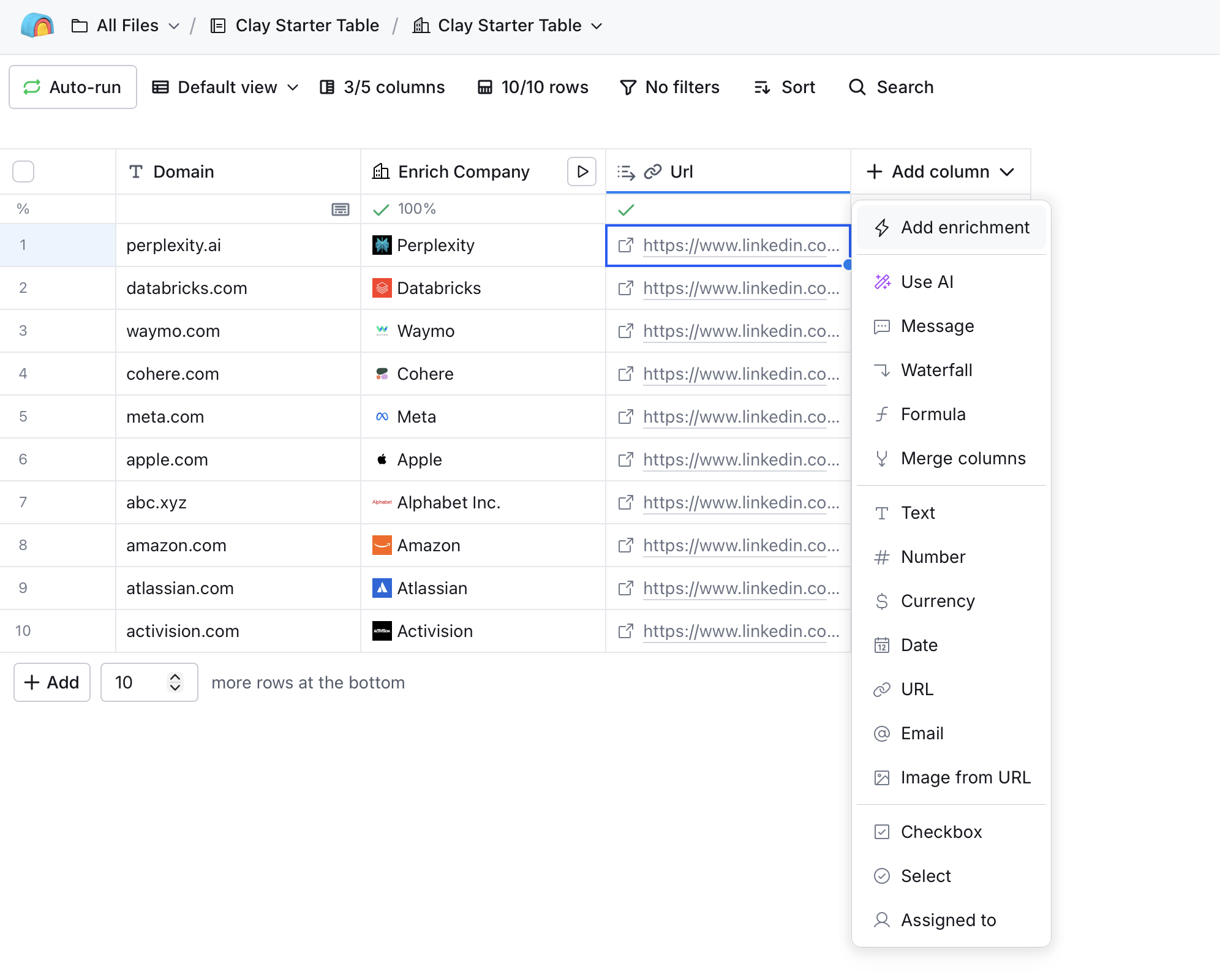 Click **+ Add column** to start adding an enrichment.
## Step 3: Add HTTP API Enrichment
Select **Add enrichment** from the column menu, then search for **HTTP API**.
Click **+ Add column** to start adding an enrichment.
## Step 3: Add HTTP API Enrichment
Select **Add enrichment** from the column menu, then search for **HTTP API**.
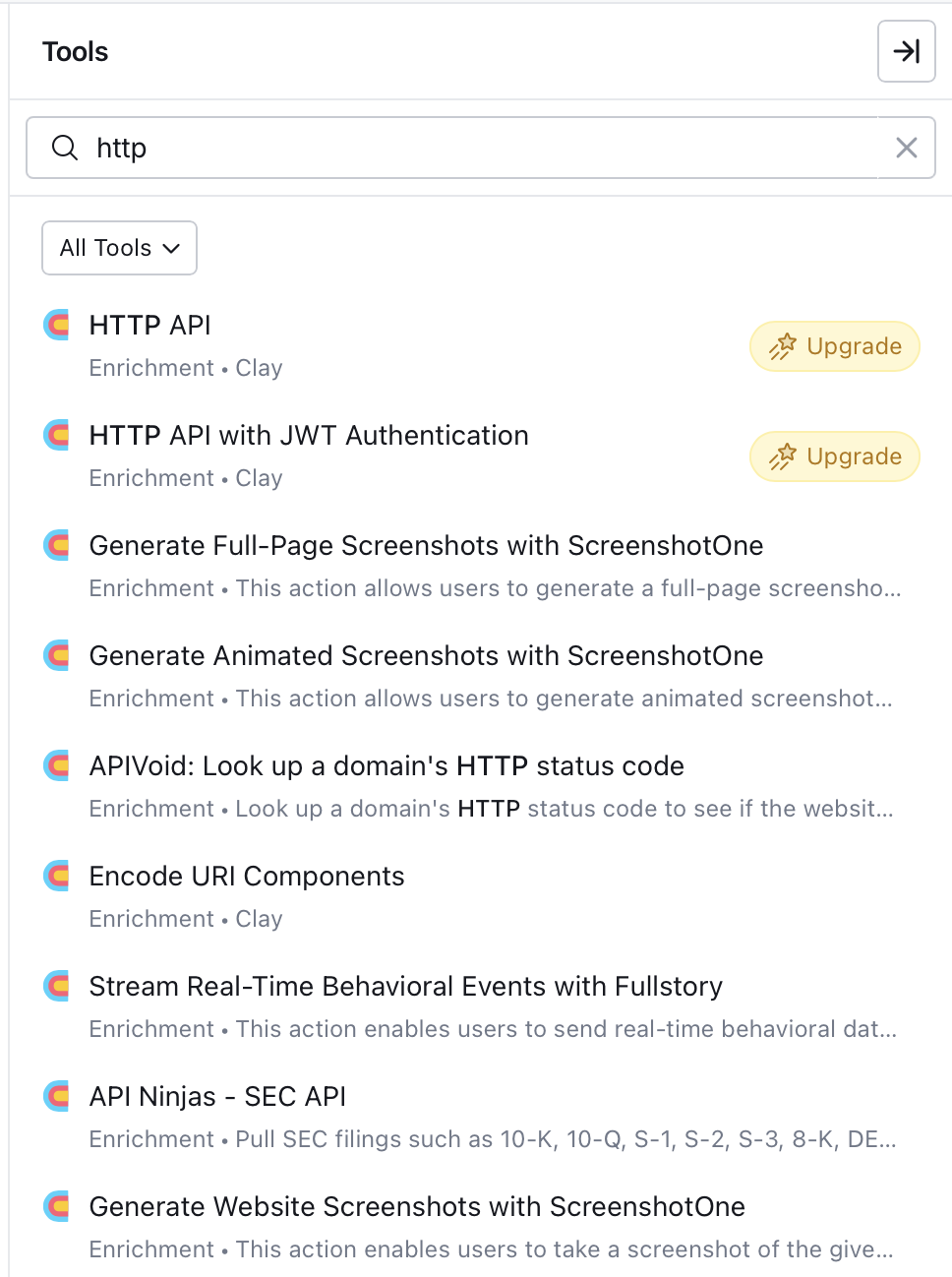 Select **HTTP API** (Enrichment · Clay).
## Step 4: Configure the API Call
Clay offers two ways to set up the HTTP API connection: **Generate** (AI-assisted) and **Configure** (manual).
### Option A: AI-Generated Setup (Recommended)
The **Generate** tab uses Clay's Sculptor AI to automatically configure the API call. Instead of writing the prompt yourself, copy a ready-made prompt from the Anysite API Reference.
**1. Open the endpoint page in [Anysite API Reference](https://docs.anysite.io/api-reference)**
Find the endpoint you need (e.g. `/linkedin/company`) and click the **AI Prompt** button next to the endpoint title.
Select **HTTP API** (Enrichment · Clay).
## Step 4: Configure the API Call
Clay offers two ways to set up the HTTP API connection: **Generate** (AI-assisted) and **Configure** (manual).
### Option A: AI-Generated Setup (Recommended)
The **Generate** tab uses Clay's Sculptor AI to automatically configure the API call. Instead of writing the prompt yourself, copy a ready-made prompt from the Anysite API Reference.
**1. Open the endpoint page in [Anysite API Reference](https://docs.anysite.io/api-reference)**
Find the endpoint you need (e.g. `/linkedin/company`) and click the **AI Prompt** button next to the endpoint title.
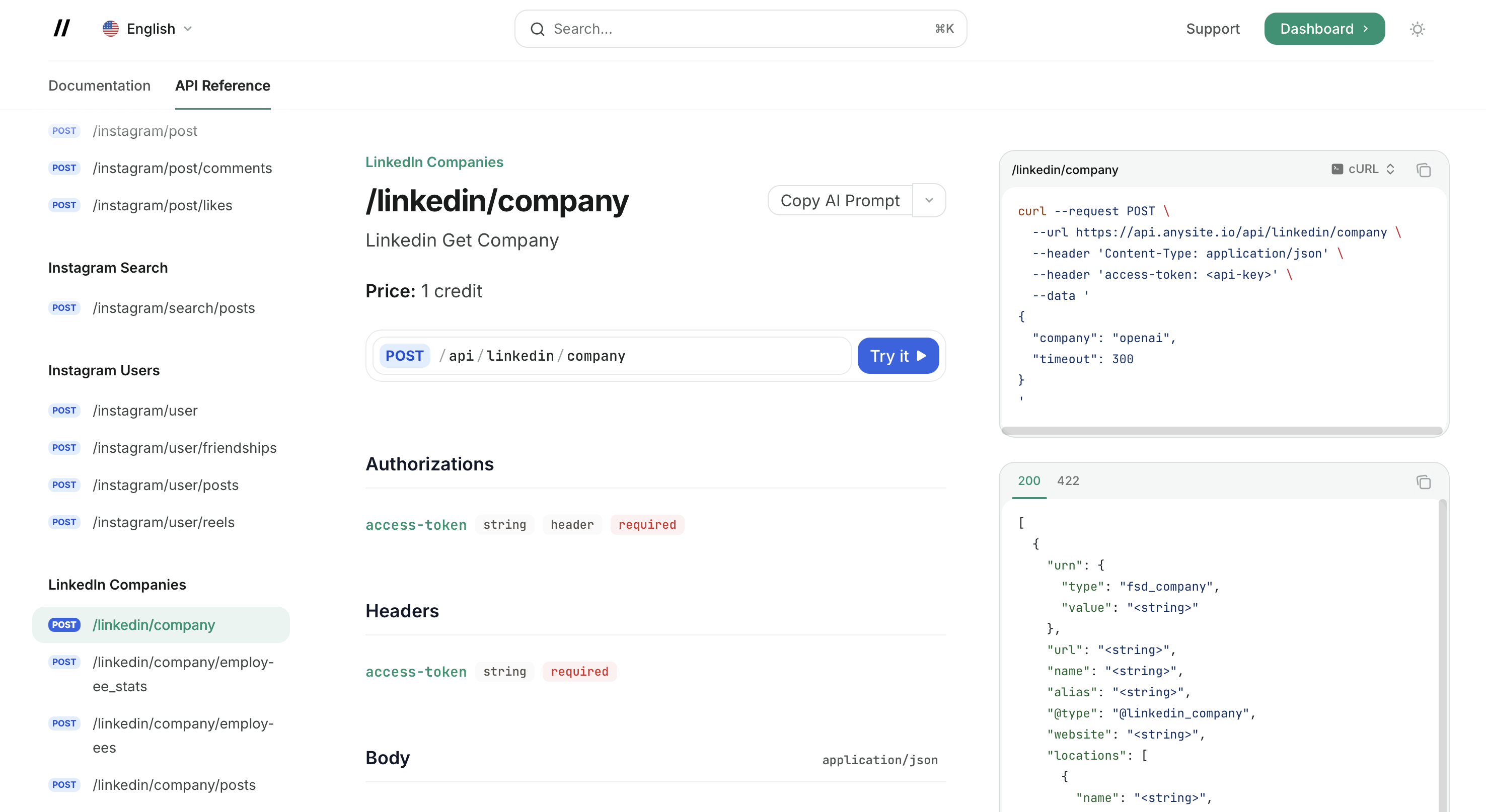 This copies a detailed prompt with the endpoint URL, authentication method, all parameters, request/response examples, and implementation requirements.
**2. Paste the prompt into Clay's Generate field**
In the HTTP API dialog, switch to the **Generate** tab and paste the copied prompt into the description field. You don't need to fill in the Documentation URL — the prompt already contains everything Sculptor needs.
This copies a detailed prompt with the endpoint URL, authentication method, all parameters, request/response examples, and implementation requirements.
**2. Paste the prompt into Clay's Generate field**
In the HTTP API dialog, switch to the **Generate** tab and paste the copied prompt into the description field. You don't need to fill in the Documentation URL — the prompt already contains everything Sculptor needs.
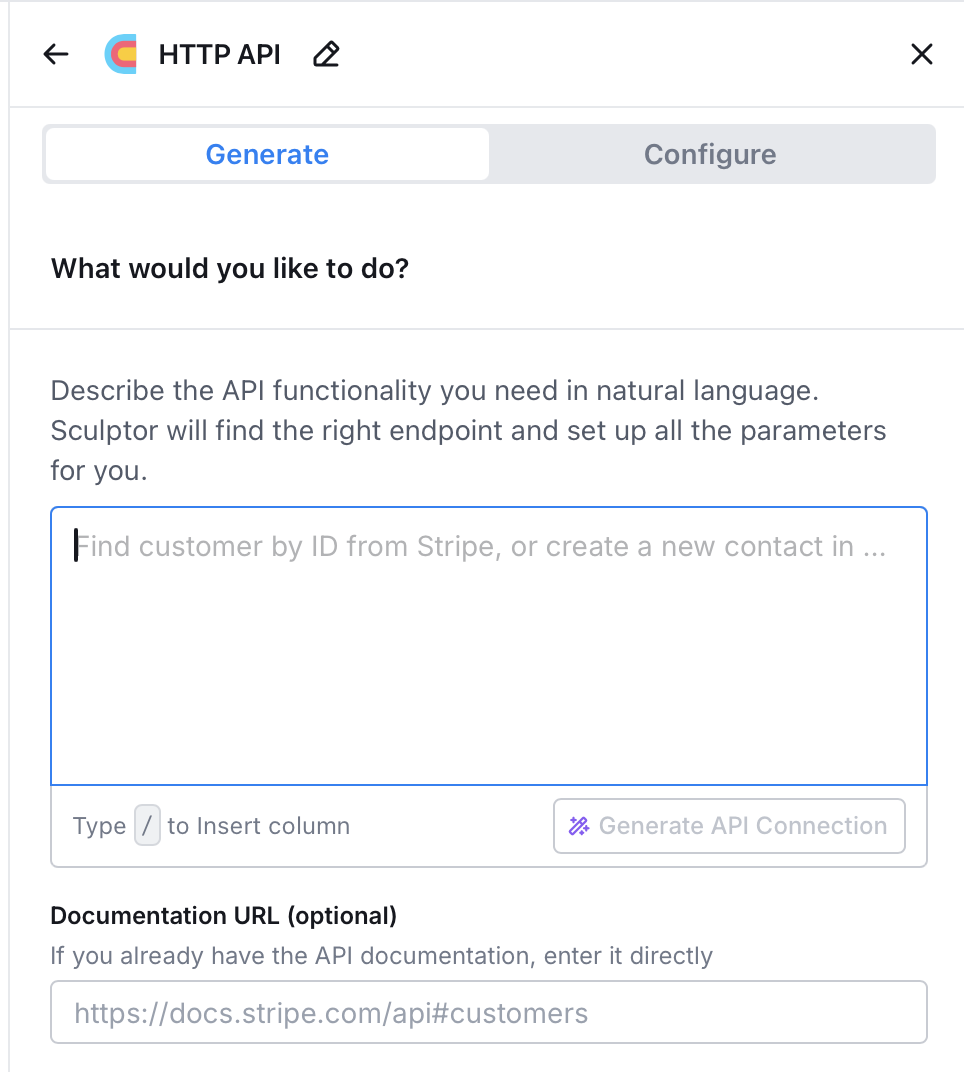
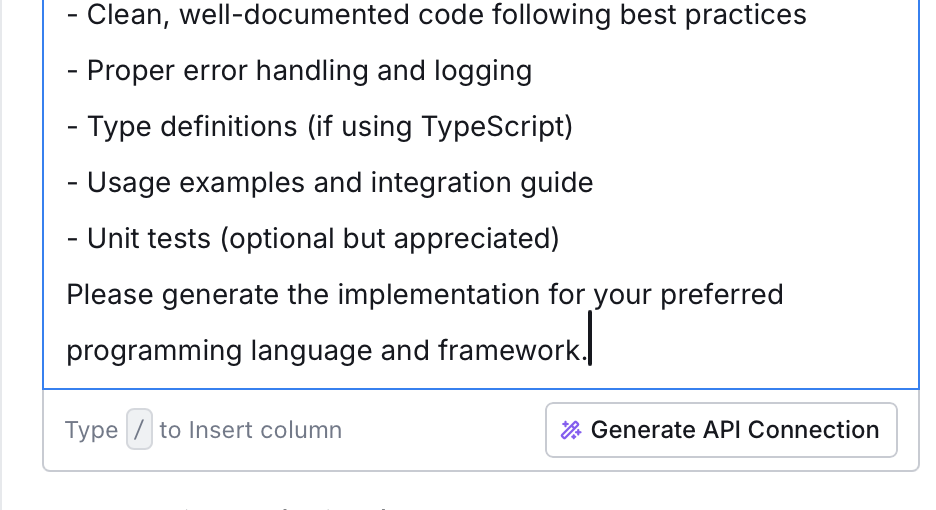 Click **Generate API Connection**. Sculptor reads the prompt and configures the method, endpoint, headers, and body mapping automatically.
**3. Review the generated connection**
Click **Generate API Connection**. Sculptor reads the prompt and configures the method, endpoint, headers, and body mapping automatically.
**3. Review the generated connection**
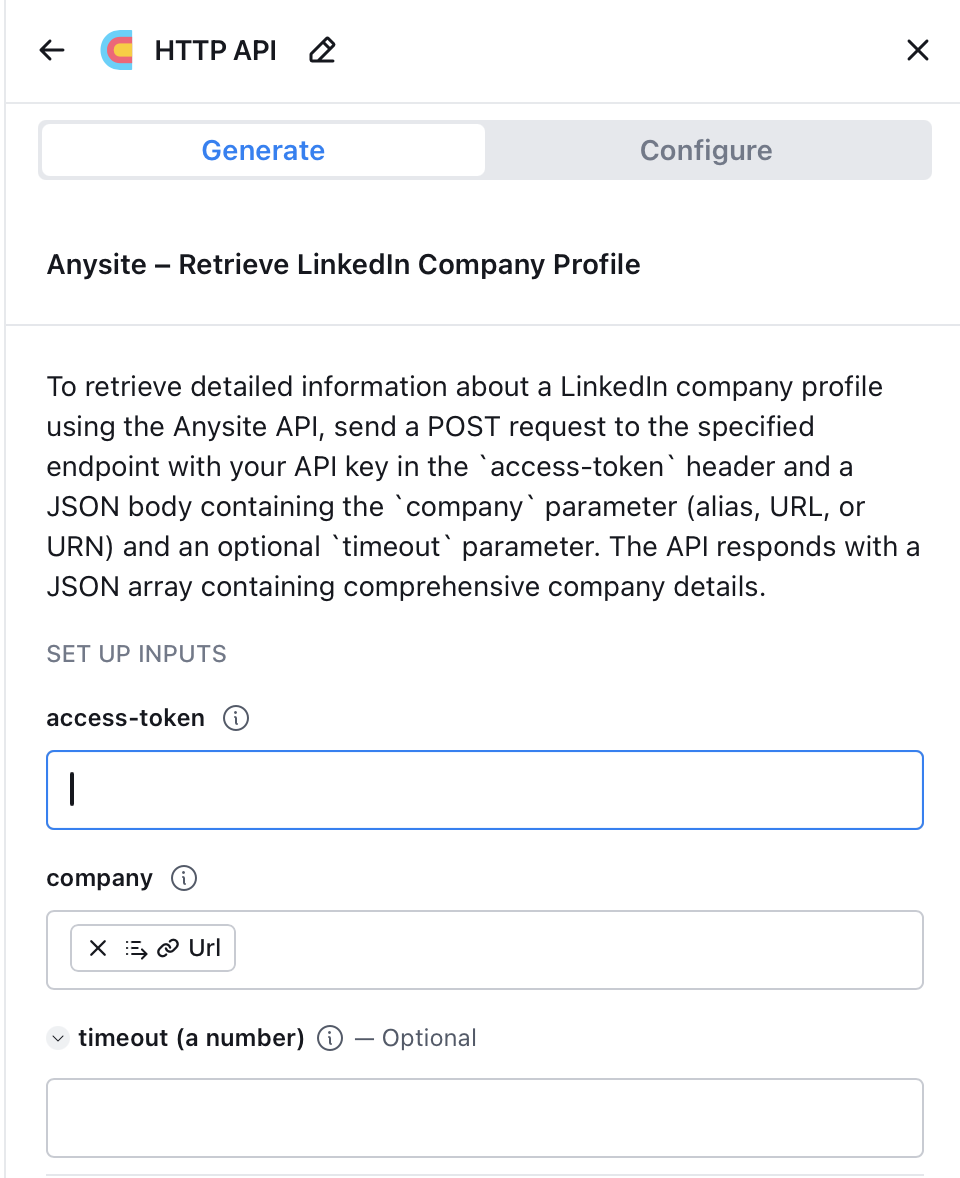 The generated connection shows:
* **access-token** field — paste your Anysite API key here
* **company** field — mapped to your table's LinkedIn URL column
* **timeout** — optional, leave empty for default (300s)
The **AI Prompt** button is available on every endpoint page in the [API Reference](https://docs.anysite.io/api-reference). Use it for any Anysite endpoint — LinkedIn, Twitter, Instagram, Reddit, YouTube, web scraping, and more.
### Option B: Manual Configuration
Switch to the **Configure** tab to set up the API call manually.
The generated connection shows:
* **access-token** field — paste your Anysite API key here
* **company** field — mapped to your table's LinkedIn URL column
* **timeout** — optional, leave empty for default (300s)
The **AI Prompt** button is available on every endpoint page in the [API Reference](https://docs.anysite.io/api-reference). Use it for any Anysite endpoint — LinkedIn, Twitter, Instagram, Reddit, YouTube, web scraping, and more.
### Option B: Manual Configuration
Switch to the **Configure** tab to set up the API call manually.
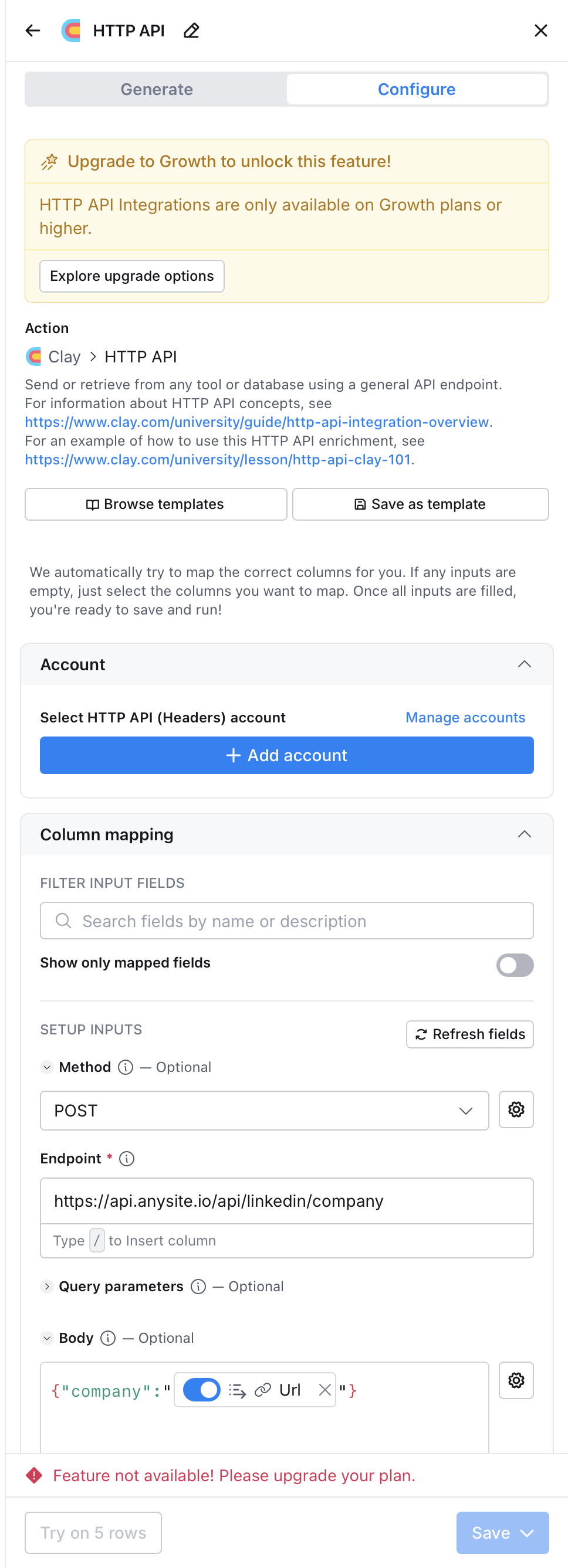 Fill in:
* **Method**: `POST`
* **Endpoint**: `https://api.anysite.io/api/linkedin/company`
* **Account**: Add HTTP API (Headers) account with `access-token: YOUR_API_KEY`
* **Body**: `{"company": "{{linkedin_url_column}}"}`
Use the `/` key in any field to insert column references from your table.
## Step 5: Map Response Fields
After running the enrichment, Clay returns structured JSON. Use Clay's **JSON path selector** to extract specific fields into new columns:
* `$.name` — company name
* `$.description` — company description
* `$.industry` — industry
* `$.employee_count` — employee count
* `$.headquarters` — headquarters location
* `$.website` — company website
## Common API Configurations
### LinkedIn Company Profile
```
POST https://api.anysite.io/api/linkedin/company
Body: { "company": "{{linkedin_url}}" }
```
Returns: name, description, industry, employee count, headquarters, specialties, recent posts.
### LinkedIn Person Profile
```
POST https://api.anysite.io/api/linkedin/user
Body: { "user": "{{linkedin_profile_url}}" }
```
Returns: full profile with experience, education, skills, current role.
### Find Decision Makers
```
POST https://api.anysite.io/api/linkedin/search/users
Body: {
"keywords": "CTO",
"company_keywords": "{{company_name}}",
"count": 5
}
```
Returns: list of matching profiles with LinkedIn URLs.
### Website Scraping
```
POST https://api.anysite.io/api/webparser/parse
Body: {
"url": "{{website_url}}",
"strip_all_tags": true,
"only_main_content": true
}
```
Returns: clean text content. Feed into a Clay AI column to extract tech stack, signals, or any structured data.
### Twitter/X User Posts
```
POST https://api.anysite.io/api/twitter/user/posts
Body: {
"user": "{{twitter_handle}}",
"count": 20
}
```
Returns: recent posts with engagement metrics — useful for identifying active companies and buying signals.
### Company Employees
```
POST https://api.anysite.io/api/linkedin/company/employees
Body: {
"companies": [{ "type": "company", "value": "{{company_urn}}" }],
"count": 10
}
```
Requires company URN from the `/api/linkedin/company` response. Run company enrichment first, extract the URN, then use it here.
## Example Workflow: B2B Lead Enrichment
A typical 5-column enrichment pipeline:
| Column | Source | What it does | Clay cost |
| --------------- | ----------- | ---------------------------- | ------------------ |
| LinkedIn URL | Input | Your lead list | Free |
| Company Data | Anysite API | `POST /api/linkedin/company` | 1 Action |
| Person Profile | Anysite API | `POST /api/linkedin/user` | 1 Action |
| Website Content | Anysite API | `POST /api/webparser/parse` | 1 Action |
| Email | Clay native | Email waterfall enrichment | 1 Action + credits |
| AI Summary | Clay AI | Personalized first line | 1 Action |
**Result:** Full lead enrichment where only email verification uses Clay data credits. LinkedIn and web scraping are handled by Anysite at API plan cost (\$49/mo for \~5,000 calls).
## Cost Comparison
For a 1,000-lead monthly workflow with LinkedIn + website + email enrichment:
| Approach | Monthly cost |
| ------------------------------ | ------------ |
| Clay native only (Growth plan) | \~\$2,200 |
| Clay + Anysite API | \~\$375 |
The difference comes from eliminating \~15,000 data credits on LinkedIn profiles and website scraping.
## API Reference
For complete endpoint documentation with all parameters, types, and constraints:
Interactive API documentation with all endpoints
Machine-readable reference with all endpoints, parameters, and examples
## Troubleshooting
Clay's HTTP API enrichment is only available on Growth plan and above. If you see "Feature not available! Please upgrade your plan", you need to upgrade your Clay subscription.
**Alternative:** Use [Clay MCP integration](/mcp-server/unlimited-plan-clay) instead — MCP works on all Clay plans that support custom MCP servers.
Anysite uses `access-token` header, **not** `Authorization: Bearer`.
When setting up the HTTP API account in Clay:
* Header name: `access-token`
* Header value: your API key from [app.anysite.io](https://app.anysite.io)
* Verify the input URL/identifier is correctly formatted
* Check that the LinkedIn profile or company page exists and is public
* Some profiles may return limited data if they are private
* Error code 404 means the entity was not found — verify the URL
* Error code 412 means the entity is unavailable (deleted or restricted)
See [Error Codes](/error-codes) for the full list.
If the AI-generated setup doesn't work:
1. Switch to the **Configure** tab and set up manually
2. Use the exact endpoint URLs from this guide
3. Make sure `access-token` is set as a header, not a query parameter
4. Verify the JSON body field names match the API documentation
* Default timeout is 300 seconds. Add `"timeout": 600` to the body for slow requests
* If you get 429 errors, reduce request frequency or check your plan limits
* Check usage at [app.anysite.io](https://app.anysite.io) dashboard
## Next Steps
Alternative: connect via MCP for unlimited requests (\$30/mo)
Browse all 50+ endpoints available via HTTP API
API key management and authentication details
Sign up and get your API key — 1,000 free credits included
Fill in:
* **Method**: `POST`
* **Endpoint**: `https://api.anysite.io/api/linkedin/company`
* **Account**: Add HTTP API (Headers) account with `access-token: YOUR_API_KEY`
* **Body**: `{"company": "{{linkedin_url_column}}"}`
Use the `/` key in any field to insert column references from your table.
## Step 5: Map Response Fields
After running the enrichment, Clay returns structured JSON. Use Clay's **JSON path selector** to extract specific fields into new columns:
* `$.name` — company name
* `$.description` — company description
* `$.industry` — industry
* `$.employee_count` — employee count
* `$.headquarters` — headquarters location
* `$.website` — company website
## Common API Configurations
### LinkedIn Company Profile
```
POST https://api.anysite.io/api/linkedin/company
Body: { "company": "{{linkedin_url}}" }
```
Returns: name, description, industry, employee count, headquarters, specialties, recent posts.
### LinkedIn Person Profile
```
POST https://api.anysite.io/api/linkedin/user
Body: { "user": "{{linkedin_profile_url}}" }
```
Returns: full profile with experience, education, skills, current role.
### Find Decision Makers
```
POST https://api.anysite.io/api/linkedin/search/users
Body: {
"keywords": "CTO",
"company_keywords": "{{company_name}}",
"count": 5
}
```
Returns: list of matching profiles with LinkedIn URLs.
### Website Scraping
```
POST https://api.anysite.io/api/webparser/parse
Body: {
"url": "{{website_url}}",
"strip_all_tags": true,
"only_main_content": true
}
```
Returns: clean text content. Feed into a Clay AI column to extract tech stack, signals, or any structured data.
### Twitter/X User Posts
```
POST https://api.anysite.io/api/twitter/user/posts
Body: {
"user": "{{twitter_handle}}",
"count": 20
}
```
Returns: recent posts with engagement metrics — useful for identifying active companies and buying signals.
### Company Employees
```
POST https://api.anysite.io/api/linkedin/company/employees
Body: {
"companies": [{ "type": "company", "value": "{{company_urn}}" }],
"count": 10
}
```
Requires company URN from the `/api/linkedin/company` response. Run company enrichment first, extract the URN, then use it here.
## Example Workflow: B2B Lead Enrichment
A typical 5-column enrichment pipeline:
| Column | Source | What it does | Clay cost |
| --------------- | ----------- | ---------------------------- | ------------------ |
| LinkedIn URL | Input | Your lead list | Free |
| Company Data | Anysite API | `POST /api/linkedin/company` | 1 Action |
| Person Profile | Anysite API | `POST /api/linkedin/user` | 1 Action |
| Website Content | Anysite API | `POST /api/webparser/parse` | 1 Action |
| Email | Clay native | Email waterfall enrichment | 1 Action + credits |
| AI Summary | Clay AI | Personalized first line | 1 Action |
**Result:** Full lead enrichment where only email verification uses Clay data credits. LinkedIn and web scraping are handled by Anysite at API plan cost (\$49/mo for \~5,000 calls).
## Cost Comparison
For a 1,000-lead monthly workflow with LinkedIn + website + email enrichment:
| Approach | Monthly cost |
| ------------------------------ | ------------ |
| Clay native only (Growth plan) | \~\$2,200 |
| Clay + Anysite API | \~\$375 |
The difference comes from eliminating \~15,000 data credits on LinkedIn profiles and website scraping.
## API Reference
For complete endpoint documentation with all parameters, types, and constraints:
Interactive API documentation with all endpoints
Machine-readable reference with all endpoints, parameters, and examples
## Troubleshooting
Clay's HTTP API enrichment is only available on Growth plan and above. If you see "Feature not available! Please upgrade your plan", you need to upgrade your Clay subscription.
**Alternative:** Use [Clay MCP integration](/mcp-server/unlimited-plan-clay) instead — MCP works on all Clay plans that support custom MCP servers.
Anysite uses `access-token` header, **not** `Authorization: Bearer`.
When setting up the HTTP API account in Clay:
* Header name: `access-token`
* Header value: your API key from [app.anysite.io](https://app.anysite.io)
* Verify the input URL/identifier is correctly formatted
* Check that the LinkedIn profile or company page exists and is public
* Some profiles may return limited data if they are private
* Error code 404 means the entity was not found — verify the URL
* Error code 412 means the entity is unavailable (deleted or restricted)
See [Error Codes](/error-codes) for the full list.
If the AI-generated setup doesn't work:
1. Switch to the **Configure** tab and set up manually
2. Use the exact endpoint URLs from this guide
3. Make sure `access-token` is set as a header, not a query parameter
4. Verify the JSON body field names match the API documentation
* Default timeout is 300 seconds. Add `"timeout": 600` to the body for slow requests
* If you get 429 errors, reduce request frequency or check your plan limits
* Check usage at [app.anysite.io](https://app.anysite.io) dashboard
## Next Steps
Alternative: connect via MCP for unlimited requests (\$30/mo)
Browse all 50+ endpoints available via HTTP API
API key management and authentication details
Sign up and get your API key — 1,000 free credits included